
Parent Welcome Center
Greetings from the Parent Welcome Center:
Ms. Livia Perez and Ms. Michelle Gonzalez are your Parent Liaisons here at Unity Reed High School. We serve as a bridge of communication between you, the parents and guardians of our students, the teachers and school administrators.
Here at Unity Reed, we understand that good communication is vital for the academic success of our students, and we take great pride in the success and achievements of our students. As such, if you, as a parent or guardian, have any concerns that may affect the academic success of your child please do not hesitate in contacting the Office of the Parent Liaison. We are here to address your concerns and work with you in providing solutions to them.
Our mission is to keep you well informed and up to date when it comes to what your child is learning and how they are progressing as they prepare for life after high school. We wish to keep you mindful of school activities and provide you with any information you may need related to school policies, graduation requirements, college, and other opportunities available for your child.
We speak both Spanish and English and we are ready and willing to help in any way possible. Our door is always open, and we look forward to working with you. We can be reached by calling 703-365-2900 or by email at [email protected], [email protected]
Respectfully,
Livia I. Pérez
URHS Parent Liaison
Quick Reference Information
Contact Information:

Dr. Livia Perez
URHS Parent Liaison
[email protected]
703-365-2900

Ms. Michelle Gonzalez
URHS Parent Liaison
[email protected]
703-365-2900
New Family Registration
The online registration process for the upcoming school year opens on the third Monday of March and is followed up with an in-person registration appointment. Students currently receiving preschool services through PWCS do not use online registration; and should contact the school at which the student will be attending Kindergarten to complete the enrollment requirements.
To register a student for the upcoming school year, follow the instructions on the Online Registration for New Families website
Back to School Returning Families
To use the online registration system, parents will access the Online Registration Account & Records Access screen. Enter your ParentVUE Username and Password and click Login. If you have never activated your ParentVUE account, please contact your student's school for assistance.
o register for the upcoming school year, scroll through the list of options and select Online Registration (New Students)* for the designated school year.
For more information visit the Online Registration for Existing Families website
ParentVUE and Canvas
- What is ParentVUE?
- ParentVUE is an online portal that allows parents and guardians access to information related to students in the district for whom they are legal guardian(s) or have rights to educational records under the Family Educational Rights and Privacy Act.
- What information am I able to access through ParentVUE?
- With this access, parents, and guardians can view student schedules and teacher assignments, bus stop information, and monitor grades and attendance. Parents and guardians can also access important documents including report cards, and Student Vision Profiles for students in grades 6-12. They can also view their student's test history and immunization records.
- What should I do if I have forgotten my ParentVUE username and password?
- If you have forgotten your username or password, click More Options button on the ParentVUE login page, click Forgot Password link, and follow prompts.
- Mobile Apps
- Download the ParentVUE app by searching "ParentVUE" in the App Store or Google Play.
Become a Canvas Observer
Canvas for Parents lets you view the lessons, the resource materials, a calendar of upcoming assignments, and the student submissions and teacher feedback.
Parentvue is the official gradebook for the course. Parents view the grade after the student submits, and the teacher provides feedback Observer/Parent Access to Canvas
Parents must begin by requesting a pairing code from their child's teacher or have their child log in to Canvas to access the pairing code.
How students obtain the Pair with Observer Code
- Student clicks on their avatar (top left) and selects settings
- On the far right, click Pair with Observer
- Copy down the code, it is case sensitive
- the pairing code can only be used once
- each time you click Pair with Observer it generates a new code
Immunizations
Student immunizations due by August 15, 2025, to begin new school year
The deadline to meet the immunization requirements for the upcoming school year is August 15, 2025. If proof of required immunizations is not provided by the deadline, the student will not be permitted to start school on Monday, August 18, 2025, until documentation is provided. Parents/guardians can view information about student immunization compliance in ParentVUE. For specific questions about immunization non-compliance or for assistance in setting up a ParentVUE account, please contact your school. A list of immunization requirements can be found on the Immunization Requirements website.
Where can my child receive a vaccination?
Your child can receive any missing immunization(s) by scheduling an appointment with your health care provider, urgent care, local pharmacy, or one of the health care clinics found below.
| Prince William Health District Manassas Clinic 9301 Lee Avenue Manassas, VA 20110 703-792-6300 Woodbridge Clinic 4001 Prince William Parkway, Suite 101 Woodbridge, VA 22192 703-792-7300 |
Mason and Partners (MAP) Manassas Park MAP Clinic 9 Tremont St Manassas Park, VA, 20111 703-993-5880 Appointments Necessary; Walk-In Availability Limited Accepts Medicaid and uninsured (children younger than 19 years old only) |
Greater Prince William Health Center GPW Health Center Dumfries, Manassas, and Woodbridge: 703-680-7950 Accepts Medicaid, insured, and uninsured Make an Appointment |
School Status
IMPORTANT NOTE: If parents unsubscribe from just one teacher's Broadcasts it will unsubscribe them from all Broadcasts from any teacher.
Once a recipient has unsubscribed, PWCS staff cannot resubscribe them without that recipient taking action.
The parent or guardian must initiate the resubscribe by scanning the QR Code below or by emailing: [email protected]
Please try texting "START" to 939393. This should unblock any conversations from both email and text associated with the number you text from. This works on all forms of communication as long as there is a current and valid text conversation with any teacher. Please note if the number for schoolstatus is blocked, this will not fix the issue as we cannot make changes to your blocked caller list.
Information for Cap and Gown, Graduation, Scholarship Opportunities for graduating families can be found on the senior class page.
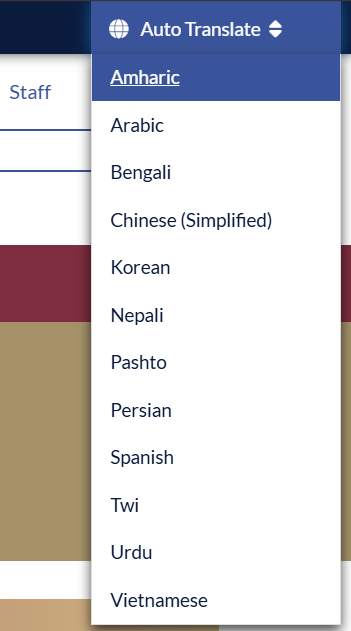
Translate the website
If needed, click autotranslate at the top right of the webpage and choose preferred language
Si es necesario, haga clic en traducción automática en la parte superior derecha de la página web y elija el idioma preferido
إذا لزم الأمر، انقر على الترجمة التلقائية في أعلى يسار صفحة الويب واختر اللغة المفضلة
در صورت نیاز، روی ترجمه خودکار در سمت راست بالای صفحه وب کلیک کنید و زبان مورد نظر را انتخاب کنید
필요한 경우 웹페이지 오른쪽 상단의 자동 번역을 클릭하고 원하는 언어를 선택합니다.
如果需要,请单击网页右上角的 autotranslate 并选择首选语言
Nếu cần, hãy nhấp vào tự động dịch ở trên cùng bên phải của trang web và chọn ngôn ngữ ưa thích